Google has introduced a practical new enhancement to its AI Mode in Google Search, allowing users on Chrome desktop to explore the web side-by-side with the AI conversational interface. Announced on April 16, 2026, and initially rolling out in the United States, this update aims to reduce the friction of tab-switching during deeper research sessions.
What Is AI Mode?
AI Mode is Google’s more advanced, conversational search experience, distinct from the quicker AI Overviews that appear automatically in standard search results.
Powered by a custom version of the Gemini model (with earlier mentions of Gemini 2.0), AI Mode excels at handling complex, multi-part questions, comparisons, reasoning, and follow-up queries.
It synthesizes information from the web, maintains context across interactions, and can draw on personal data like Gmail or Photos for tailored responses when permitted.
Unlike a one-shot AI Overview, AI Mode functions more like a chat-based assistant within Search, making it suitable for exploratory tasks such as product research, comparing options, or diving into nuanced topics.
The New Side-by-Side Feature
The latest update brings a split-view experience specifically on Chrome desktop:
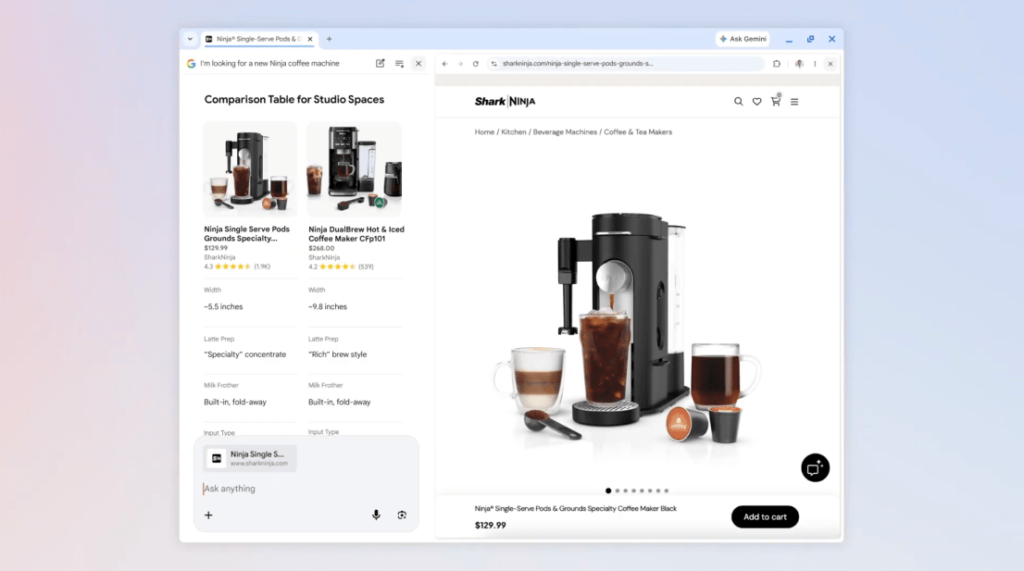
- While engaged in AI Mode, clicking on any suggested link or source opens the full webpage alongside the AI chat panel.
- This keeps the conversational context intact, so you can reference the original query, ask follow-up questions informed by the page content, or get AI assistance directly related to what you’re viewing (e.g., “How easy is this coffee maker to clean?” while looking at a retailer’s product page).
- It addresses a common pain point: constantly switching between search results/AI responses and actual web pages, which can disrupt focus—especially with long articles, videos, or multi-source comparisons.
Google noted that early testers appreciated not having to juggle tabs, helping them stay on task while exploring useful content.
Practical Use Cases
This feature shines in scenarios requiring both AI synthesis and direct web exploration:
- Shopping/research — Describe your needs (e.g., “I need a reliable coffee maker under $100 with easy maintenance”), review AI suggestions, then open retailer pages side-by-side to inspect details and ask the AI targeted questions based on what you see.
- Deep dives — Read a comprehensive article or watch a video in one pane while using AI Mode in the other to summarize, clarify points, or compare with other sources.
- Contextual follow-ups — The AI can pull from the open page plus broader web knowledge without losing thread from your initial query.
A related but separate feature lets users search across open Chrome tabs (including recent ones), images, or files directly from the search box or AI Mode via a new “plus” menu—useful for combining hiking trail info from multiple tabs or studying with class notes.
Availability and Rollout
- Currently: Available on Chrome desktop in the United States as of April 16, 2026.
- Expansion: Google plans to roll it out to more regions over time.
- Access: Enter AI Mode through Google Search (it may appear as a dedicated mode or tab for complex queries). The side-by-side link behavior activates within that interface on desktop Chrome.
Note that AI Mode itself has been evolving since its introduction in 2025, with prior updates adding features like resuming past conversations.
Why This Matters
In an era where AI is reshaping search—from quick summaries to full conversational agents—this update bridges the gap between AI-generated insights and the raw, detailed web. It reduces cognitive load for users tackling “high-consideration” tasks that benefit from both synthesized answers and primary sources.
By keeping everything visible at once, Google is making AI Mode feel less like a black-box chatbot and more like a helpful co-pilot for actual web browsing. While no major limitations were highlighted in the announcement, real-world usability will depend on how smoothly the split view performs across different screen sizes and connection speeds.
As AI search features continue to mature, expect further integration between conversational modes and traditional browsing. For now, U.S. Chrome users can try the side-by-side experience today for more fluid, context-aware exploration. If you’re doing in-depth research, it could quickly become a favorite workflow upgrade.